
CONVERGE Horizon

High-Performance Cloud Computing
CONVERGE Horizon is a cloud computing platform that enables you to run fast, secure CFD simulations in the cloud. If you don't have access to an on-premise cluster, or if you're short on compute resources, we've got you covered! CONVERGE Horizon provides easy access to the latest hardware at a discount. Our cloud computing resources are optimized for the CONVERGE solver, ensuring an excellent performance-to-cost ratio. In addition, CONVERGE Horizon offers on-demand licensing for CONVERGE, allowing you to pay for only the software you need for your workload.
Already have an account?
Sign in on the CONVERGE Horizon Platform

End-to-End Cloud Capabilities
From case setup to post-processing, you can conduct your entire simulation workflow directly in the cloud through CONVERGE Horizon. To start with, the workstations feature enables you to access CONVERGE Studio on a virtual machine to set up your case. Next, choose from a variety of state-of-the-art bare metal node and virtual machine options to efficiently and economically run your simulation. Finally, you can analyze your results and post-process your data in ParaView or Tecplot—or the post-processing software of your choice—back on the workstation. Whether you prefer a fully cloud-based workflow or local pre- and post-processing, CONVERGE Horizon makes the cloud work for you.
First-Rate Data Security
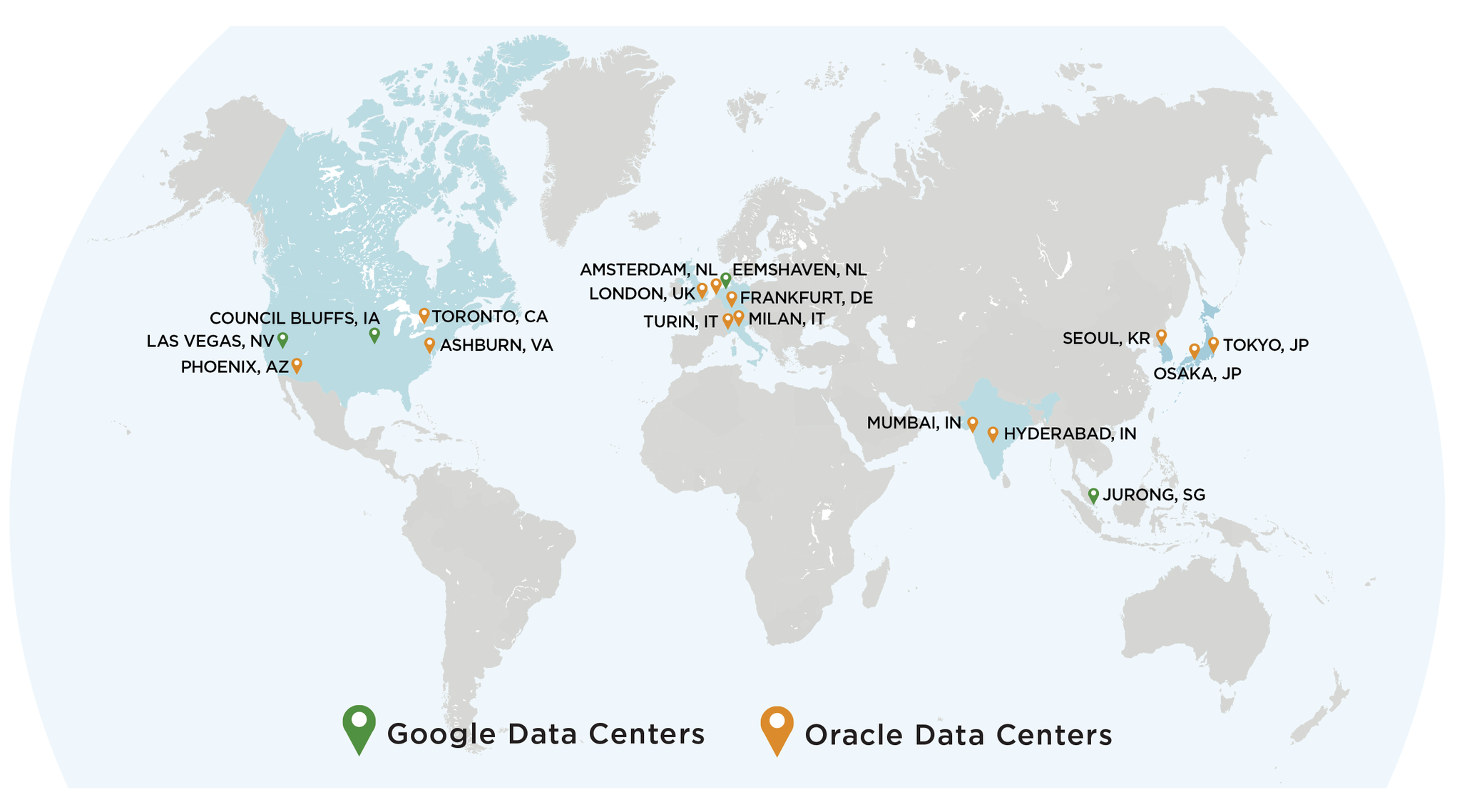
Security is critical when you're running proprietary simulations in the cloud. With our cloud providers, we take a security-first approach, employing isolated network virtualization to prevent attacks and keep your data safe. Additionally, you can choose from different data center locations around the world to ensure compliance with any jurisdictional or organizational requirements. CONVERGE Horizon undergoes third-party testing to ensure our security measures are working effectively to keep your data secure.
Running a Job
CONVERGE Horizon features an easy-to-use web interface where you can submit and monitor jobs, as well as a command-line interface if you prefer to manage your jobs from your local file system. The web interface provides real-time usage and billing information, making it simple to keep track of your projects and stay within your budget. In addition, you can access the web interface on your mobile device, so you can launch and monitor jobs even when you're on the go.
With a variety of licensing and hardware options for running jobs, you can find the right combination to fit both your budget and your simulation requirements.
Licensing Options
On-Demand Licensing
Through CONVERGE Horizon, you're not just getting a great deal on hardware—you can also access CONVERGE on demand! This flexible option allows you to pay for only the software you need for your workload. If you're conducting a one-time simulation study, or if you need additional licenses to run multiple jobs in parallel, purchasing CONVERGE on demand is a cost-effective solution.
On-demand CONVERGE licenses include access to CONVERGE Studio for all your pre- and post-processing needs. In addition, take advantage of our free live and on-demand training to get up to speed with CONVERGE, and make use of our available support options—free in the Gold tier and above—if you need personalized assistance setting up your case.
Run Jobs on CONVERGE Horizon
With on-demand software and hardware on CONVERGE Horizon, you can customize your setup for every job. Select the best node type to optimize runtime and minimize costs for each specific case, ensuring your results come in on time and within your budget.
Run Jobs on Prem
If you have your own hardware but like the flexibility of an on-demand license, CONVERGE Horizon has a solution for you: cloud-based license servers. With this option, you can set up a license server on CONVERGE Horizon that allows you to run CONVERGE on demand on your on-premise cluster.
Bring-Your-Own License
For teams with a heavy CFD workload, a conventional CONVERGE license is the most economical licensing option—and you can still get the benefit of cost-effective, on-demand hardware. We offer two approaches for using a conventional CONVERGE license on CONVERGE Horizon.
Self-Hosted
If your organization has a conventional CONVERGE license hosted on an on-premise license server, you can check out licenses from that server to run jobs on CONVERGE Horizon. Purchasing a conventional CONVERGE license will be the most economical option if your workload requires you to run many CFD simulations. When you use this option on CONVERGE Horizon, an additional WAN fee may apply. If you are interested in purchasing a CONVERGE license, please contact us through this form.
Horizon-Hosted
If you don't have on-premise hardware, you can purchase a conventional CONVERGE license that we will host for you on CONVERGE Horizon. Hosting your license on CONVERGE Horizon eliminates the hassle of setting up and maintaining your own cluster, so you can take full advantage of the cloud computing experience. Note that an additional WAN fee may apply.
On-Demand License Pricing
On-demand CONVERGE licenses are priced per node-hour based on your subscription tier and the number of cores allocated to your job.
|
Subscription Tier
Commitment
|
Bronze
$0-15k
|
Silver
$15k-50k
|
Gold
$50k-200k
|
Platinum
$200k-500k
|
Diamond
$500k+
|
|||||
|---|---|---|---|---|---|---|---|---|---|---|
| Number of Cores | Cost Range | Cost per Core in This Range | Cost Range | Cost per Core in This Range | Cost Range | Cost per Core in This Range | Cost Range | Cost per Core in This Range | Cost Range | Cost per Core in This Range |
| 1-8 | $18.00 | - | $12.00 | - | $10.00 | - | $8.00 | - | $6.00 | - |
| 9-24 | $18.60 - 27.60 | $0.60 | $12.40 - 18.40 | $0.40 | $10.30 - 14.80 | $0.30 | $8.24 - 11.84 | $0.24 | $6.20 - 9.20 | $0.20 |
| 25-72 | $27.90 - 42.00 | $0.30 | $18.60 - 28.00 | $0.20 | $14.95 - 22.00 | $0.15 | $11.96 - 17.60 | $0.12 | $9.30 - 14.00 | $0.10 |
| 73-216 | $42.10 - 56.40 | $0.10 | $28.07 - 37.50 | $0.066 | $22.05 - 29.20 | $0.05 | $17.64 - 23.36 | $0.04 | $14.03 - 18.32 | $0.03 |
| >216 | $56.45+ | $0.05 | $37.54+ | $0.033 | $29.23+ | $0.025 | $23.38+ | $0.02 | $18.34+ | $0.015 |

Hardware Options
CONVERGE Horizon offers both AMD and Intel bare metal (BM) node types, listed in the table below. The AMD options are ideal for small- to medium-sized cases with high memory requirements. If you're looking to run a large job on multiple nodes, the Intel option enables you to take advantage of CONVERGE's excellent scaling to achieve a quicker turnaround on your results. In addition, CONVERGE Horizon offers flexible virtual machine options that allows you to choose how many cores and how much memory to allocate for your job.
| Type | Cloud Provider | Cores per Node | Memory (GB) | Network | Maximum Number of Nodes per Job |
|---|---|---|---|---|---|
| BM-AMD-GENOA-192 | Oracle Cloud | 192 | 2304 | Ethernet | 1 |
| BM-AMD-TURIN-192 | Google Cloud | 192 | 720 | Falcon | 20 |
| BM-AMD-TURIN-192-HM | Google Cloud | 192 | 1488 | Falcon | 20 |
| BM-AMD-TURIN-192-AX | Oracle Cloud | 192 | 1536 | Ethernet | 1 |
| BM-AMD-TURIN-256 | Oracle Cloud | 256 | 3072 | Ethernet | 1 |
| BM-INTEL-ICELAKE-36 | Oracle Cloud | 36 | 512 | RDMA | 25 |
| BM-INTEL-SAPPHIRE-88 | Google Cloud | 88 | 352 | Ethernet | 1 |
| VM-AMD | Oracle Cloud | 1-94 | 16-512 | Ethernet | 1 |
| VM-AMD-TURIN | Oracle Cloud | 1-126 | 16-512 | Ethernet | 1 |
| VM-AMD-TURIN-AX | Oracle Cloud | 1-94 | 16-512 | Ethernet | 1 |
Hardware Pricing
Please note that hardware prices are the same across all subscription tiers.
Bare Metal Nodes
| Node Type | Cost per Node-Hour |
|---|---|
| BM-AMD-GENOA-192 | $10.38 |
| BM-AMD-TURIN-192 | $11.00 |
| BM-AMD-TURIN-192-HM | $13.00 |
| BM-AMD-TURIN-192-AX | $20.21 |
| BM-AMD-TURIN-256 | $13.84 |
| BM-INTEL-ICELAKE-36 | $2.73 |
| BM-INTEL-SAPPHIRE-88 | $6.00 |
Virtual Machines
| Node Type | Cost per Core-Hour | Cost per GB of Memory per Hour |
|---|---|---|
| VM-AMD | $0.03 | $0.002 |
| VM-AMD-TURIN | $0.03 | $0.002 |
| VM-AMD-TURIN-AX | $0.0138 | $0.0108 |
Cost Estimator
|
Subscription Tier Commitment
|
Bronze $0–15k
|
Silver $15k–50k
|
Gold $50k–200k
|
Platinum $200k–500k
|
Diamond $500k+
|
|---|---|---|---|---|---|
| Total | |||||
| Hardware Cost: | |||||
| License Cost: |
Storage
File Systems
CONVERGE Horizon file systems are a persistent cloud storage solution that allow users to store, manage, and share their data within their team. Because file systems are mounted directly to the job cluster, you don't need to worry about long wait times when copying input files to the cluster at the beginning of the simulation or when moving the output files off the cluster at the end. This creates an efficient, streamlined process for running your simulations. In addition, file systems can be accessed through a login node that runs on a Linux operating system, enabling a wide range of command-line and scripting workflows.
Pricing
Because file systems run persistently on a virtual machine, they incur a monthly hardware fee in addition to a monthly data storage fee.
| Resource | Cost |
|---|---|
| Storage | $40.50 per TB per month |
| File System Hardware - Standard | $100.00 per month |
| File System Hardware - Performance | Starting at $200.00 per month** |
Pre- and Post-Processing
Workstations
You can pre- and post-process your simulations directly in the cloud using the workstations feature on CONVERGE Horizon. Workstations are special-purpose nodes configured for graphics-intensive applications. They come preloaded with CONVERGE Studio, Tecplot for CONVERGE, and ParaView, and you can install any other programs you need for your simulation workflow. In addition, you can attach a job's file system to the workstation to view your simulation results in real time. The workstations run on state-of-the-art Intel processors with NVIDIA GPUs, providing a seamless user experience even when working with large geometries or data sets.
| Type | Processor | Cores | Memory (GB) | GPU | Cost per Node-Hour |
|---|---|---|---|---|---|
| VM-INTEL-GPU-15 | Intel Xeon Platinum 8358 | 15 | 240 | NVIDIA A10 24 GB RAM | $2.01 |
| VM-INTEL-GPU-30 | Intel Xeon Platinum 8358 | 30 | 480 | NVIDIA A10 24 GB RAM | $4.01 |
In Situ Post-Processing
In a traditional cloud CFD workflow, when your simulation is complete you must download your data to local storage or access your data on the cloud server to begin post-processing. CONVERGE offers a time-saving alternative: in situ post-processing via ParaView Catalyst. With this approach, ParaView accesses the CONVERGE data at a user-specified interval and performs the post-processing directly on the cloud processors while the simulation is running. At the end of the simulation, you can download just the subset of fully-processed files you need—a much smaller amount of data than in a traditional workflow. In addition to saving time, this method allows you to entirely automate your post-processing procedure.
Customer Profiles
CONVERGE Horizon is designed to be flexible and convenient, so you can tailor your experience to your own unique CFD workflow. Whether you're just starting up a business, part of a well-established team, or pursuing your academic studies, find out how CONVERGE Horizon can work for you!
Small/Startup Company
CONVERGE Horizon can help startups and small businesses save money, while still providing access to advanced simulation and computing solutions. You don't need to invest in an expensive cluster or commit to an annual software license, which saves you large upfront costs while you're getting off the ground. Instead, you can take advantage of on-demand access to latest-generation hardware and CONVERGE licenses, using as much or as little of these resources as you need, so you can focus on establishing and growing your business.
Enterprise Company
CONVERGE Horizon offers many benefits for large companies, even ones that have access to on-premise servers and traditional CONVERGE licenses. If your team is tackling a project with a heavy CFD workload, or if you need access to more cores than your on-prem system can spare, you can supplement your resources with CONVERGE Horizon. With access to virtually unlimited computing power in the cloud, you can run as many simulations—and as large of cases—as you need. Moreover, you can use your existing CONVERGE licenses to run cases on CONVERGE Horizon, or you can purchase additional on-demand licenses to accommodate an increased simulation workload.
Consultant
Being a CFD consultant means keeping track of several simulation caseloads for several clients at the same time. The CONVERGE Horizon platform is structured to help you manage these different accounts. By setting up each client as a "team" on the platform, you can easily keep track of your ongoing projects and view individual billing information for each client. Using CONVERGE's on-demand licensing also means you only need to pay for the licensing and hardware costs required for your current set of clients, without worrying about how to handle any lulls or surges in your simulation workload.
Academic User
Collaborating with your colleagues and lab members is a cornerstone of the academic world—CONVERGE Horizon facilitates collaboration through shared teams and storage options. Because you can use your academic license to run on CONVERGE Horizon, this is also a highly cost-effective solution for labs and universities to gain access to top-tier computing resources. At Convergent Science, we want to empower the next generation of engineers by ensuring students, professors, and academic researchers have the resources they need to conduct innovative research.
How to Get Started
Interested in trying CONVERGE Horizon? Contact us at [email protected]!
Already have an account? Sign in on the CONVERGE Horizon interface.
Looking for information on how to set up your account? Check out the CONVERGE Horizon Getting Started guide.
Notes
- CONVERGE Horizon tiers are based on a running 12-month window of expenditures on both CONVERGE Horizon and conventional CONVERGE licenses.
- CONVERGE Horizon credits are valid for two years.
- Reasonable email and phone support is available free of charge for CONVERGE Horizon users in the Gold, Platinum, and Diamond tiers; users in the Bronze and Silver tiers can pay to receive support.
- A data egress cost of $0.0085 per GB of Oracle Cloud Infrastructure storage and $0.085 per GB of Google Cloud Platform storage will be incurred whenever data is downloaded from the cloud.
- Hardware is billed for a minimum of 1 hour for bare metal (BM) nodes and a minimum of 1 minute for virtual machine (VM) nodes. For example, if you run a job for 30 minutes on a BM node, you will be charged for 1 hour for that node. This minimum charge applies only to hardware costs; it does not apply to licensing costs.
- The prices listed on this website are subject to change; contact your sales representative or email [email protected] for more information.
Contact Us Today
Learn more about how CONVERGE helps you quickly and accurately solve your CFD problems.